- /
-
- Blog /
- Ollama vs Llama.cpp
Ollama vs Llama.cpp
How I improved tokens per second performance by 10% (7 minutes read)
2026-06-05

Why
Previously, I ran llamacpp just to prove things were working, then later switched to ollama for simplicity, but now I want to return to llamacpp. It should be more performant, but I want to check for myself. I want to run the Gemma 4 31B model, but with llamacpp there are so many more options to choose from with various quantizations that I want to benchmark which one will be the go-to one for my setups. One for a dual GPU setup dedicated to AI, but powered only on demand when I need it. And one with a single GPU but running 24/7. So having something for random ad hoc tasks and one for more targeted and intentional API calls.
Benchmark
Running similarly sized variants of gemma4:31b. On these two base platforms, my model decision is here if you want to skip it.
AI rig
Dedicated to AI but not running constantly:
- Operating System: Debian 13
- Hardware: Gigabyte Z390i + i5-9400 + 64GB RAM
- GPUs: 2x GeForce RTX 5060Ti 16GB (together 29.8GiB)
- connected with PCIe bifurcation to one 16x slot.
- CUDA compute capability: 12.0
Will be running:
- Model
gemma-4-31B-it-GGUF:Q4_1, a slightly different quantization than Ollama's variant. - Context 90000.
- Listen on all interfaces.
- Disabled multimodal, as I'm not interested in voice or video.
- Jinja to support tool calling (which is on by default, but this way explicitly).
- Offload all layers to VRAM.
- DirectIO to avoid using up RAM and read directly from storage.
- Flash attention to improve the memory footprint of the KV cache, speed up prompt processing prefill, and allow a longer context window.
- Lowering memory consumption of the KV cache by 50% by switching from default 16-bit to 8-bit caches without affecting accuracy that much.
- Temperature lowered from 1.0 to 0.1 to make it much more deterministic and make sampling match Ollama values.
- With the following command:
/opt/bin/llama-server -m /home/ai/.cache/huggingface/hub/models--unsloth--gemma-4-31B-it-qat-GGUF/snapshots/0ad8071a52116c0ec83e13c0232b58cd5ab0681f/gemma-4-31B-it-GGUF:Q4_1 -c 90000 --jinja --port 8080 --gpu-layers all --direct-io --flash-attn on -ctk q8_0 -ctv q8_0 --temp 1.0 --top-k 64 --top-p 0.95 --host 0.0.0.0 --no-mmproj
NAS rig
A virtual machine running inside the Proxmox NAS setup, with PCIe passthrough for the GPU:
- Operating System: Windows
- Hardware: Gigabyte B560i + Ryzen-9600X + 96GB RAM
- GPU: GeForce RTX 4060Ti 16GB (14.9GiB)
- CUDA compute capability: 8.9
Will be running:
- Similar to above, but hesitating between the 31B model, which is much more heavily quantized by Q2, or a 12B-Q4 model.
- Much smaller context window 16k.
- Providing a folder (with just one model) and
models-autoloadto avoid loading that model on start-up will still limit only one model to be used, but it will not occupy memory unless requests are made. - Sleep idle allows holding that model for 30 mins before unloading, so in essence having llama running in the background but only occupying memory if used.
- Lowering temperature to 0.0 to make it more deterministic.
- With the following command:
llama-server --models-dir C:/Users/fredy/.cache/huggingface/hub/models--unsloth--gemma-4-31B-it-GGUF:UD-IQ2_M/snapshots/10a5e68e89865d0eefaa910c00334643a1093ee9 --models-autoload --sleep-idle-seconds 1800 --direct-io --gpu-layers all --flash-attn on -ctk q8_0 -ctv q8_0 --temp 0.0 --top-k 64 --top-p 0.95 --no-mmproj --host 0.0.0.0 -c 16000
The idea is to not load the model straight away, but only on demand, and offload it as soon as possible to not hog the shared machine and GPU with this task. Also, a much more quantized model had to be used to fit into the VRAM.
Why Gemma 4
It runs well with Cline. Thinking/reasoning, chain, tool invocation, and editing files work well enough. Doesn't go spastic as much as others in my experience. While the 26b is faster and smaller, it is a mix of experts and not always as good in Cline (can end up failing on a file edit and looping with errors much more easily). And then the 31b and 12b are dense models and could be used on the NAS for more casual requests when the dual GPU rig is not running.
Summary and decision
Both engines are optimized for environments with a single user and a maximum single request running at any time. And to make it fair, I matched llamacpp to ollama's parameters.
| Model | Engine | Quantization | Size (GB) | Context | t/s | Split mode |
|---|---|---|---|---|---|---|
| gemma4:31b | Ollama | Q4_K_M | 19 | 32k | 19.96 | default |
| gemma-4-31B-it-GGUF | llamacpp | Q4_K_M | 18.3 | 32k | 22.0 | default |
The size discrepancy is likely due to the fact that Ollama's model bundles in a single file the multimodal model, while with llamacpp it's a separate file (which we can later explicitly tell not to load).
Commands used:
OLLAMA_MAX_LOADED_MODELS=1 && OLLAMA_NUM_PARALLEL=1 && ollama run --verbose gemma4:31b "write simple C++ webserver"llama-cli -hf unsloth/gemma-4-31B-it-GGUF:Q4_0 --reasoning off --temp 1.0 --top-k 64 --top-p 0.9 -c 2048 -p "write simple c++ hello world"
Going to switch to llamacpp because:
- When using the same quantization and same context, llamacpp is ~10% faster.
- The new llamacpp webui is much nicer and more responsive than Ollama's GUI:
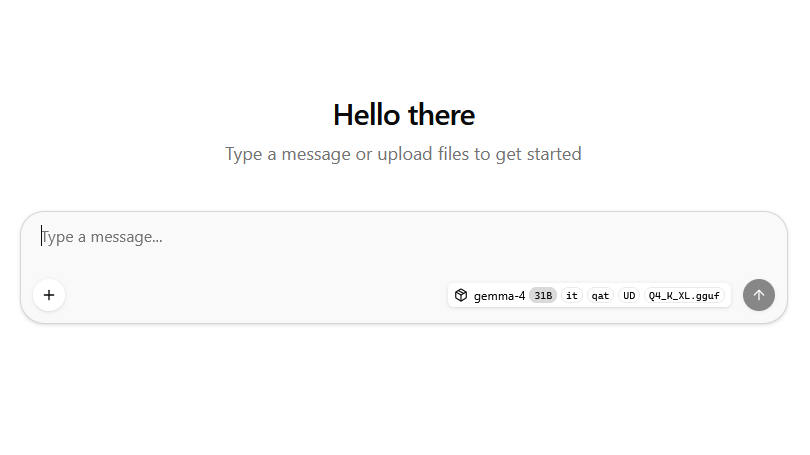
- Ollama is an unnecessary wrapper. I want direct access to fine-tune and tweak llamacpp.
- Llamacpp gives finer control over settings such as multi-GPU tensor split.
- More in control of versions/features: do I want to rebuild within minutes of a pull request being merged, do I want to build interesting work from a branch before it was merged, or do I want to downgrade to a previous commit because something worked better there? Everything is possible with llamacpp, but with ollama it is not.
- Ollama is trying to push cloud models more and more, and I do not like it. Even if it might not be as big a deal, as their Ollama models are just an extra bonus, we can use the same Hugging Face models on both anyway. But at the same time, the one appeal of Ollama is going away. Having a decent amount, but not an overwhelming amount, of model choices compared to Hugging Face, as the Hugging Face choices might look intimidating—just one model has many quantization selections:
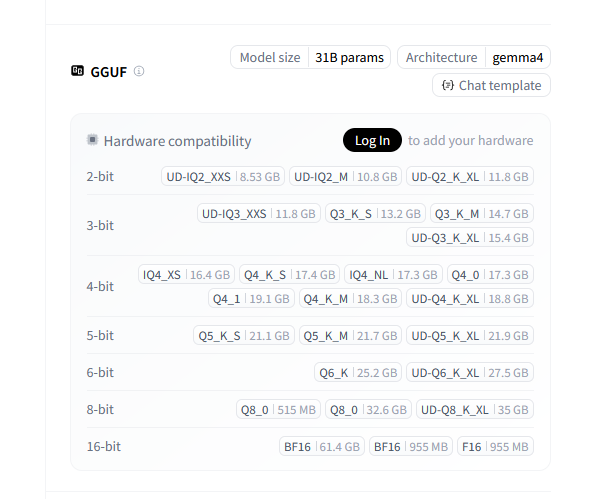
So llamacpp won and I am going to switch, but now I want to figure out which exact model quantization I should use. The section below shows the runs I did on Ollama and llamacpp. And I also want to experiment a tiny bit with single GPU model sizes and compare how much overhead there is running them on two GPUs.
You can skip the details below if not interested.
Runs
Ollama - splitting the load on two GPUs
Going to figure out the details of the ollama model: ollama show gemma4:31b
1   Model
2     architecture        gemma4
3     parameters          31.3B
4     context length      262144
5     embedding length    5376
6     quantization        Q4_K_M
7     requires            0.20.0
8
9   Capabilities
10     completion
11     vision
12     tools
13     thinking
14
15   Parameters
16     temperature    1
17     top_k          64
18     top_p          0.95
19
20   License
21     Apache License
22     Version 2.0, January 2004
23     ...
Quantization is Q4_K_M, temperature 1, top_k 64 and top_p 0.95
I did multiple runs. They fluctuate a tiny bit, but the average is under 20 tokens/s.
ollama run --verbose gemma4:31b "write simple C++ webserver"
1 total duration:       1m55.384730898s
2 load duration:        12.326818119s
3 prompt eval count:    22 token(s)
4 prompt eval duration: 69.191131ms
5 prompt eval rate:     317.96 tokens/s
6 eval count:           2032 token(s)
7 eval duration:        1m41.752473912s
8 eval rate:            19.97 tokens/s
1 total duration: 1m35.045527887s
2 load duration: 297.417321ms
3 prompt eval count: 22 token(s)
4 prompt eval duration: 63.148366ms
5 prompt eval rate: 348.39 tokens/s
6 eval count: 1874 token(s)
7 eval duration: 1m33.667665968s
8 eval rate: 19.99 tokens/s1 total duration: 1m55.730248723s
2 load duration: 294.014649ms
3 prompt eval count: 22 token(s)
4 prompt eval duration: 63.19743ms
5 prompt eval rate: 348.12 tokens/s
6 eval count: 2275 token(s)
7 eval duration: 1m54.110752464s
8 eval rate: 19.94 tokens/sAnd the context-window is 32k:
 ollama ps
NAME          ID              SIZE     PROCESSOR    CONTEXT    UNTIL
gemma4:31b    6316f0629137    28 GB    100% GPU     32768      4 hours from now
Llamacpp
The GeForce RTX 5060 Ti uses the Blackwell architecture and has a CUDA Compute Capability of 12.0, and I built llamacpp with 120. See compilation post for more details.
Checking GPU support:
1 ai@ai:~$ llama-server --list-devices
2 Available devices:
3   CUDA0: NVIDIA GeForce RTX 5060 Ti (15849 MiB, 15712 MiB free)
4   CUDA1: NVIDIA GeForce RTX 5060 Ti (15849 MiB, 15712 MiB free)
2-bit and 3-bit dual GPU
llama-bench -hf unsloth/gemma-4-31B-it-GGUF:UD-IQ2_XXS -hf unsloth/gemma-4-31B-it-GGUF:UD-IQ2_M -hf unsloth/gemma-4-31B-it-GGUF:Q3_K_M -n 512 -d 8192,32768,65536,131072,190000
Bit higher context windows:
llama-bench -hf unsloth/gemma-4-31B-it-GGUF:UD-IQ2_M -hf unsloth/gemma-4-31B-it-GGUF:UD-IQ2_XXS -n 512 -d 230000
Maximum context window:
llama-bench -hf unsloth/gemma-4-31B-it-GGUF:UD-IQ2_XXS -n 512 -d 262144
| model | size | params | backend | ngl | test | t/s |
|---|---|---|---|---|---|---|
| gemma4 31B IQ2_XXS - 2.0625 bpw | 7.93 GiB | 30.70 B | CUDA | -1 | pp512 @ d8192 | 798.88 ± 2.13 |
| gemma4 31B IQ2_XXS - 2.0625 bpw | 7.93 GiB | 30.70 B | CUDA | -1 | tg512 @ d8192 | 31.25 ± 0.00 |
| gemma4 31B IQ2_XXS - 2.0625 bpw | 7.93 GiB | 30.70 B | CUDA | -1 | pp512 @ d32768 | 538.31 ± 2.36 |
| gemma4 31B IQ2_XXS - 2.0625 bpw | 7.93 GiB | 30.70 B | CUDA | -1 | tg512 @ d32768 | 27.21 ± 0.00 |
| gemma4 31B IQ2_XXS - 2.0625 bpw | 7.93 GiB | 30.70 B | CUDA | -1 | pp512 @ d65536 | 376.02 ± 0.49 |
| gemma4 31B IQ2_XXS - 2.0625 bpw | 7.93 GiB | 30.70 B | CUDA | -1 | tg512 @ d65536 | 23.77 ± 0.00 |
| gemma4 31B IQ2_XXS - 2.0625 bpw | 7.93 GiB | 30.70 B | CUDA | -1 | pp512 @ d131072 | 234.13 ± 0.19 |
| gemma4 31B IQ2_XXS - 2.0625 bpw | 7.93 GiB | 30.70 B | CUDA | -1 | tg512 @ d131072 | 17.90 ± 0.00 |
| gemma4 31B IQ2_XXS - 2.0625 bpw | 7.93 GiB | 30.70 B | CUDA | -1 | pp512 @ d190000 | 174.62 ± 0.11 |
| gemma4 31B IQ2_XXS - 2.0625 bpw | 7.93 GiB | 30.70 B | CUDA | -1 | tg512 @ d190000 | 14.97 ± 0.00 |
| gemma4 31B IQ2_XXS - 2.0625 bpw | 7.93 GiB | 30.70 B | CUDA | -1 | pp512 @ d230000 | 149.02 ± 0.09 |
| gemma4 31B IQ2_XXS - 2.0625 bpw | 7.93 GiB | 30.70 B | CUDA | -1 | tg512 @ d230000 | 13.38 ± 0.00 |
| gemma4 31B IQ2_XXS - 2.0625 bpw | 7.93 GiB | 30.70 B | CUDA | -1 | pp512 @ d262144 | 132.02 ± 0.10 |
| gemma4 31B IQ2_XXS - 2.0625 bpw | 7.93 GiB | 30.70 B | CUDA | -1 | tg512 @ d262144 | 12.44 ± 0.00 |
| gemma4 31B IQ2_M - 2.7 bpw | 10.00 GiB | 30.70 B | CUDA | -1 | pp512 @ d8192 | 660.15 ± 1.79 |
| gemma4 31B IQ2_M - 2.7 bpw | 10.00 GiB | 30.70 B | CUDA | -1 | tg512 @ d8192 | 27.65 ± 0.00 |
| gemma4 31B IQ2_M - 2.7 bpw | 10.00 GiB | 30.70 B | CUDA | -1 | pp512 @ d32768 | 472.82 ± 0.81 |
| gemma4 31B IQ2_M - 2.7 bpw | 10.00 GiB | 30.70 B | CUDA | -1 | tg512 @ d32768 | 24.43 ± 0.00 |
| gemma4 31B IQ2_M - 2.7 bpw | 10.00 GiB | 30.70 B | CUDA | -1 | pp512 @ d65536 | 342.64 ± 0.46 |
| gemma4 31B IQ2_M - 2.7 bpw | 10.00 GiB | 30.70 B | CUDA | -1 | tg512 @ d65536 | 21.62 ± 0.00 |
| gemma4 31B IQ2_M - 2.7 bpw | 10.00 GiB | 30.70 B | CUDA | -1 | pp512 @ d131072 | 220.65 ± 0.13 |
| gemma4 31B IQ2_M - 2.7 bpw | 10.00 GiB | 30.70 B | CUDA | -1 | tg512 @ d131072 | 16.65 ± 0.00 |
| gemma4 31B IQ2_M - 2.7 bpw | 10.00 GiB | 30.70 B | CUDA | -1 | pp512 @ d190000 | 166.96 ± 0.11 |
| gemma4 31B IQ2_M - 2.7 bpw | 10.00 GiB | 30.70 B | CUDA | -1 | tg512 @ d190000 | 14.09 ± 0.00 |
| gemma4 31B IQ2_M - 2.7 bpw | 10.00 GiB | 30.70 B | CUDA | -1 | pp512 @ d230000 | 141.98 ± 0.14 |
| gemma4 31B IQ2_M - 2.7 bpw | 10.00 GiB | 30.70 B | CUDA | -1 | tg512 @ d230000 | 12.69 ± 0.00 |
| gemma4 31B Q3_K - Medium | 13.71 GiB | 30.70 B | CUDA | -1 | pp512 @ d8192 | 684.59 ± 2.77 |
| gemma4 31B Q3_K - Medium | 13.71 GiB | 30.70 B | CUDA | -1 | tg512 @ d8192 | 22.12 ± 0.00 |
| gemma4 31B Q3_K - Medium | 13.71 GiB | 30.70 B | CUDA | -1 | pp512 @ d32768 | 485.47 ± 0.95 |
| gemma4 31B Q3_K - Medium | 13.71 GiB | 30.70 B | CUDA | -1 | tg512 @ d32768 | 19.93 ± 0.00 |
| gemma4 31B Q3_K - Medium | 13.71 GiB | 30.70 B | CUDA | -1 | pp512 @ d65536 | 348.94 ± 0.52 |
| gemma4 31B Q3_K - Medium | 13.71 GiB | 30.70 B | CUDA | -1 | tg512 @ d65536 | 18.07 ± 0.00 |
| gemma4 31B Q3_K - Medium | 13.71 GiB | 30.70 B | CUDA | -1 | pp512 @ d131072 | 223.23 ± 0.20 |
| gemma4 31B Q3_K - Medium | 13.71 GiB | 30.70 B | CUDA | -1 | tg512 @ d131072 | 14.48 ± 0.00 |
| gemma4 31B Q3_K - Medium | 13.71 GiB | 30.70 B | CUDA | -1 | pp512 @ d190000 | 166.84 ± 0.10 |
| gemma4 31B Q3_K - Medium | 13.71 GiB | 30.70 B | CUDA | -1 | tg512 @ d190000 | 12.48 ± 0.00 |
2-bit on single GPU
llama-bench -hf unsloth/gemma-4-31B-it-GGUF:UD-IQ2_XXS --split-mode none --main-gpu 1 -n 512 -d 8192,32768,65536
| model | size | params | backend | ngl | main_gpu | sm | test | t/s |
|---|---|---|---|---|---|---|---|---|
| gemma4 31B IQ2_XXS - 2.0625 bpw | 7.93 GiB | 30.70 B | CUDA | -1 | 1 | none | pp512 @ d8192 | 791.74 ± 9.66 |
| gemma4 31B IQ2_XXS - 2.0625 bpw | 7.93 GiB | 30.70 B | CUDA | -1 | 1 | none | tg512 @ d8192 | 30.55 ± 0.09 |
| gemma4 31B IQ2_XXS - 2.0625 bpw | 7.93 GiB | 30.70 B | CUDA | -1 | 1 | none | pp512 @ d32768 | 537.26 ± 2.05 |
| gemma4 31B IQ2_XXS - 2.0625 bpw | 7.93 GiB | 30.70 B | CUDA | -1 | 1 | none | tg512 @ d32768 | 26.82 ± 0.03 |
| gemma4 31B IQ2_XXS - 2.0625 bpw | 7.93 GiB | 30.70 B | CUDA | -1 | 1 | none | pp512 @ d65536 | 375.05 ± 1.08 |
| gemma4 31B IQ2_XXS - 2.0625 bpw | 7.93 GiB | 30.70 B | CUDA | -1 | 1 | none | tg512 @ d65536 | 23.69 ± 0.01 |
Similar to the default dual GPU setup, overhead from the layer setup is minimal, and running a single GPU will let it trigger thermals sooner and not let it turbo as much as two GPUs with half load each.
2-bit tensor dual GPU
Instead of dividing the model sequentially (where GPU 1 sits around waiting for GPU 0), --split-mode tensor splits the individual matrix math blocks of every single layer across both GPUs simultaneously.
It requires a lot of communication between the cards. If GPUs are connected via a slow motherboard slot, the overhead can very well have negative effects on performance.
llama-bench -hf unsloth/gemma-4-31B-it-GGUF:UD-IQ2_XXS --split-mode tensor --main-gpu 1 -n 512 -d 8192,32768,65536
| model | size | params | backend | ngl | main_gpu | sm | test | t/s |
|---|---|---|---|---|---|---|---|---|
| gemma4 31B IQ2_XXS - 2.0625 bpw | 7.93 GiB | 30.70 B | CUDA | -1 | 1 | tensor | pp512 @ d8192 | 953.70 ± 18.05 |
| gemma4 31B IQ2_XXS - 2.0625 bpw | 7.93 GiB | 30.70 B | CUDA | -1 | 1 | tensor | tg512 @ d8192 | 50.23 ± 0.06 |
| gemma4 31B IQ2_XXS - 2.0625 bpw | 7.93 GiB | 30.70 B | CUDA | -1 | 1 | tensor | pp512 @ d32768 | 757.52 ± 11.50 |
| gemma4 31B IQ2_XXS - 2.0625 bpw | 7.93 GiB | 30.70 B | CUDA | -1 | 1 | tensor | tg512 @ d32768 | 44.35 ± 0.07 |
| gemma4 31B IQ2_XXS - 2.0625 bpw | 7.93 GiB | 30.70 B | CUDA | -1 | 1 | tensor | pp512 @ d65536 | 595.87 ± 7.08 |
| gemma4 31B IQ2_XXS - 2.0625 bpw | 7.93 GiB | 30.70 B | CUDA | -1 | 1 | tensor | tg512 @ d65536 | 40.01 ± 0.06 |
Results are promising. Using tensor almost doubles the performance.
More details about it in separate post.
4-bit on dual GPU
llama-bench -hf unsloth/gemma-4-31B-it-GGUF:IQ4_XS -hf unsloth/gemma-4-31B-it-GGUF:Q4_0 -hf unsloth/gemma-4-31B-it-GGUF:Q4_1 -n 512 -d 8192,32768,65536,131072
And to test a bigger context window:
llama-bench -hf unsloth/gemma-4-31B-it-GGUF:IQ4_XS -n 512 -d 163840
| model | size | params | backend | ngl | test | t/s |
|---|---|---|---|---|---|---|
| gemma4 31B IQ4_XS - 4.25 bpw | 15.23 GiB | 30.70 B | CUDA | -1 | pp512 @ d8192 | 841.03 ± 4.60 |
| gemma4 31B IQ4_XS - 4.25 bpw | 15.23 GiB | 30.70 B | CUDA | -1 | tg512 @ d8192 | 21.78 ± 0.00 |
| gemma4 31B IQ4_XS - 4.25 bpw | 15.23 GiB | 30.70 B | CUDA | -1 | pp512 @ d32768 | 558.09 ± 1.25 |
| gemma4 31B IQ4_XS - 4.25 bpw | 15.23 GiB | 30.70 B | CUDA | -1 | tg512 @ d32768 | 19.67 ± 0.00 |
| gemma4 31B IQ4_XS - 4.25 bpw | 15.23 GiB | 30.70 B | CUDA | -1 | pp512 @ d65536 | 385.18 ± 0.66 |
| gemma4 31B IQ4_XS - 4.25 bpw | 15.23 GiB | 30.70 B | CUDA | -1 | tg512 @ d65536 | 17.85 ± 0.00 |
| gemma4 31B IQ4_XS - 4.25 bpw | 15.23 GiB | 30.70 B | CUDA | -1 | pp512 @ d131072 | 237.50 ± 0.22 |
| gemma4 31B IQ4_XS - 4.25 bpw | 15.23 GiB | 30.70 B | CUDA | -1 | tg512 @ d131072 | 14.34 ± 0.00 |
| gemma4 31B IQ4_XS - 4.25 bpw | 15.23 GiB | 30.70 B | CUDA | -1 | pp512 @ d163840 | 197.36 ± 0.18 |
| gemma4 31B IQ4_XS - 4.25 bpw | 15.23 GiB | 30.70 B | CUDA | -1 | tg512 @ d163840 | 13.29 ± 0.00 |
| gemma4 31B Q4_0 | 16.13 GiB | 30.70 B | CUDA | -1 | pp512 @ d8192 | 824.93 ± 4.40 |
| gemma4 31B Q4_0 | 16.13 GiB | 30.70 B | CUDA | -1 | tg512 @ d8192 | 20.84 ± 0.00 |
| gemma4 31B Q4_0 | 16.13 GiB | 30.70 B | CUDA | -1 | pp512 @ d32768 | 551.16 ± 1.25 |
| gemma4 31B Q4_0 | 16.13 GiB | 30.70 B | CUDA | -1 | tg512 @ d32768 | 18.90 ± 0.00 |
| gemma4 31B Q4_0 | 16.13 GiB | 30.70 B | CUDA | -1 | pp512 @ d65536 | 382.09 ± 0.65 |
| gemma4 31B Q4_0 | 16.13 GiB | 30.70 B | CUDA | -1 | tg512 @ d65536 | 17.22 ± 0.00 |
| gemma4 31B Q4_0 | 16.13 GiB | 30.70 B | CUDA | -1 | pp512 @ d131072 | 236.39 ± 0.22 |
| gemma4 31B Q4_0 | 16.13 GiB | 30.70 B | CUDA | -1 | tg512 @ d131072 | 13.93 ± 0.00 |
| gemma4 31B Q4_1 | 17.79 GiB | 30.70 B | CUDA | -1 | pp512 @ d8192 | 780.59 ± 3.65 |
| gemma4 31B Q4_1 | 17.79 GiB | 30.70 B | CUDA | -1 | tg512 @ d8192 | 19.16 ± 0.00 |
| gemma4 31B Q4_1 | 17.79 GiB | 30.70 B | CUDA | -1 | pp512 @ d32768 | 531.21 ± 1.25 |
| gemma4 31B Q4_1 | 17.79 GiB | 30.70 B | CUDA | -1 | tg512 @ d32768 | 17.51 ± 0.00 |
| gemma4 31B Q4_1 | 17.79 GiB | 30.70 B | CUDA | -1 | pp512 @ d65536 | 372.39 ± 0.61 |
| gemma4 31B Q4_1 | 17.79 GiB | 30.70 B | CUDA | -1 | tg512 @ d65536 | 16.05 ± 0.00 |
| gemma4 31B Q4_1 | 17.79 GiB | 30.70 B | CUDA | -1 | pp512 @ d131072 | 230.52 ± 0.26 |
| gemma4 31B Q4_1 | 17.79 GiB | 30.70 B | CUDA | -1 | tg512 @ d131072 | 13.14 ± 0.00 |
5-bit on dual GPU
Model unsloth/gemma-4-31B-it-GGUF:Q5_K_XL might be too big for a context window bigger than 64k. While medium and small variants can have ~90k context window.
So I run just medium and small variants:
llama-bench -hf unsloth/gemma-4-31B-it-GGUF:Q5_K_M -hf unsloth/gemma-4-31B-it-GGUF:Q5_K_S -n 256,512 -d 8192,32768,65536,95000
| model | size | params | backend | ngl | test | t/s |
|---|---|---|---|---|---|---|
| gemma4 31B Q5_K - Medium | 20.16 GiB | 30.70 B | CUDA | -1 | pp512 @ d8192 | 731.06 ± 3.07 |
| gemma4 31B Q5_K - Medium | 20.16 GiB | 30.70 B | CUDA | -1 | tg256 @ d8192 | 17.11 ± 0.00 |
| gemma4 31B Q5_K - Medium | 20.16 GiB | 30.70 B | CUDA | -1 | tg512 @ d8192 | 17.09 ± 0.00 |
| gemma4 31B Q5_K - Medium | 20.16 GiB | 30.70 B | CUDA | -1 | pp512 @ d32768 | 507.55 ± 1.17 |
| gemma4 31B Q5_K - Medium | 20.16 GiB | 30.70 B | CUDA | -1 | tg256 @ d32768 | 15.82 ± 0.00 |
| gemma4 31B Q5_K - Medium | 20.16 GiB | 30.70 B | CUDA | -1 | tg512 @ d32768 | 15.81 ± 0.00 |
| gemma4 31B Q5_K - Medium | 20.16 GiB | 30.70 B | CUDA | -1 | pp512 @ d65536 | 360.52 ± 0.56 |
| gemma4 31B Q5_K - Medium | 20.16 GiB | 30.70 B | CUDA | -1 | tg256 @ d65536 | 14.58 ± 0.00 |
| gemma4 31B Q5_K - Medium | 20.16 GiB | 30.70 B | CUDA | -1 | tg512 @ d65536 | 14.57 ± 0.00 |
| gemma4 31B Q5_K - Medium | 20.16 GiB | 30.70 B | CUDA | -1 | pp512 @ d95000 | 282.92 ± 0.45 |
| gemma4 31B Q5_K - Medium | 20.16 GiB | 30.70 B | CUDA | -1 | tg256 @ d95000 | 13.26 ± 0.00 |
| gemma4 31B Q5_K - Medium | 20.16 GiB | 30.70 B | CUDA | -1 | tg512 @ d95000 | 13.26 ± 0.00 |
| gemma4 31B Q5_K - Small | 19.66 GiB | 30.70 B | CUDA | -1 | pp512 @ d8192 | 753.69 ± 1.99 |
| gemma4 31B Q5_K - Small | 19.66 GiB | 30.70 B | CUDA | -1 | tg256 @ d8192 | 17.45 ± 0.00 |
| gemma4 31B Q5_K - Small | 19.66 GiB | 30.70 B | CUDA | -1 | tg512 @ d8192 | 17.43 ± 0.00 |
| gemma4 31B Q5_K - Small | 19.66 GiB | 30.70 B | CUDA | -1 | pp512 @ d32768 | 518.44 ± 1.11 |
| gemma4 31B Q5_K - Small | 19.66 GiB | 30.70 B | CUDA | -1 | tg256 @ d32768 | 16.11 ± 0.00 |
| gemma4 31B Q5_K - Small | 19.66 GiB | 30.70 B | CUDA | -1 | tg512 @ d32768 | 16.10 ± 0.00 |
| gemma4 31B Q5_K - Small | 19.66 GiB | 30.70 B | CUDA | -1 | pp512 @ d65536 | 366.11 ± 0.57 |
| gemma4 31B Q5_K - Small | 19.66 GiB | 30.70 B | CUDA | -1 | tg256 @ d65536 | 14.82 ± 0.00 |
| gemma4 31B Q5_K - Small | 19.66 GiB | 30.70 B | CUDA | -1 | tg512 @ d65536 | 14.82 ± 0.00 |
| gemma4 31B Q5_K - Small | 19.66 GiB | 30.70 B | CUDA | -1 | pp512 @ d95000 | 288.83 ± 0.37 |
| gemma4 31B Q5_K - Small | 19.66 GiB | 30.70 B | CUDA | -1 | tg256 @ d95000 | 13.47 ± 0.00 |
| gemma4 31B Q5_K - Small | 19.66 GiB | 30.70 B | CUDA | -1 | tg512 @ d95000 | 13.47 ± 0.00 |
Irrelevant
As mentioned above, these are now not as important thanks to Gemma 4 Quantization-Aware-Training variants, where now the Q4 variant provides better perplexity than before, and instead of speculating if I should run Q5 or Q4_0 or Q4_1, now the answer is simpler: the qat_Q4 should be better than these. More in the follow-up article. But I will still leave it in place in case somebody finds it interesting, like the performance scaling down depending on the context size, etc.
References
- Hugging Face gemma-4-31B-it-GGUF
- Ollama gemma4
- llamacpp GitHub
- llamacpp server readme
- llamacpp split modes
- Gemma 4 QAT release
- QAT quantization aware training
- Quantization aware training for LLMs
- CUDA Compute Capabilities table
- CUDA SDK toolkit download page
- UD - Unsloth Dynamic
- NVIDIA Collective Communication Library (NCCL)
- Perplexity